

Tutorials#
Getting started#
First, install llmSHAP with the recommended extras:
pip install "llmshap[all]"
pip install -e ".[all]"
Next, create a .env file in the root directory to store your API keys:
# Used for the OpenAIInterface.
OPENAI_API_KEY = <your_api_key_here>
llmSHAP - Usage#
There are 4 main components to the library: DataHandler, PromptCodec, LLMInterface, and AttributionFunction.
DataHandler: Handles the data. This class can get subsets of the data and convert the desired data into a format that is suitable for a large language model (LLM).PromptCodec: Turns a data selection into a prompt and parses the model’s reply.LLMInterface: The model backend (OpenAI, Mistral, local, etc.).AttributionFunction: Computes the attribution scores for each chunk.
Let’s now walk through a small example. We’ll use a string (token-level features) and keep a few uninteresting tokens permanently included.
We start by importing the relevant classes:
from llmSHAP import DataHandler, BasicPromptCodec, ShapleyAttribution
from llmSHAP.llm import OpenAIInterface
We can now create the data, which is a simple string, and instantiate our data handler. We select the indices of the tokens/words “In”, “is”, and “the” as permanent keys, since these tokens would increase computation time while likely providing little useful insight.
data = "In what city is the Eiffel Tower?"
handler = DataHandler(data, permanent_keys={0,3,4})
The DataHandler will split this string on spaces and create a Python dict with the word indices as keys.
We need a PromptCodec to interact with the LLM and for this example we will use the llmSHAP.BasicPromptCodec prompt codec.
prompt_codec = BasicPromptCodec(system="Answer the question briefly.")
Finally, we create the LLM interface, which will allow us to interact with an LLM (local or API-based).
llm = OpenAIInterface(model_name="gpt-4o-mini")
We are now ready to compute the attribution score for each token in the string (except for “In”, “is”, and “the” since they are permanent).
shap = ShapleyAttribution(model=llm, data_handler=handler, prompt_codec=prompt_codec, use_cache=True)
result = shap.attribution()
The full code should now look like this:
from llmSHAP import DataHandler, BasicPromptCodec, ShapleyAttribution
from llmSHAP.llm import OpenAIInterface

data = "In what city is the Eiffel Tower?"
handler = DataHandler(data, permanent_keys={0,3,4})
prompt_codec = BasicPromptCodec(system="Answer the question briefly.")
llm = OpenAIInterface(model_name="gpt-4o-mini")

shap = ShapleyAttribution(model=llm, data_handler=handler, prompt_codec=prompt_codec, use_cache=True)
result = shap.attribution()

# We can now print the results.
print("\n\n### OUTPUT ###")
print(result.output) # The LLM's answer to the question.

print("\n\n### ATTRIBUTION ###")
print(result.attribution) # The attribution score mapping.
Threads#
llmSHAP also supports multi-threading, via the num_threads parameter in ShapleyAttribution.
This assumes that the LLM inference backend can
handle multiple concurrent inference requests, since the parallelization happens at the
inference call level.
The example below runs Shapley attribution on a 7-feature input string with
1-10 threads and measures the runtime (requires pip install matplotlib).
import time
import matplotlib.pyplot as plt
from llmSHAP import DataHandler, BasicPromptCodec, ShapleyAttribution
from llmSHAP.llm import OpenAIInterface

data = "In what city is the Eiffel Tower?"
handler = DataHandler(data, permanent_keys=None)
prompt_codec = BasicPromptCodec(system="Answer the question briefly.")
llm = OpenAIInterface(model_name="gpt-4o-mini")

times = []
threads = list(range(1, 11))
for num_threads in threads:
   shap = ShapleyAttribution(model=llm,
                              data_handler=handler,
                              prompt_codec=prompt_codec,
                              use_cache=True,
                              num_threads=num_threads)
   start = time.time()
   _ = shap.attribution()
   times.append(time.time() - start)

plt.plot(threads, times, marker="o")
plt.xlabel("Number of Threads")
plt.ylabel("Time (seconds)")
plt.title("Shapley Attribution Runtime vs Threads")
plt.grid(True)
plt.show()
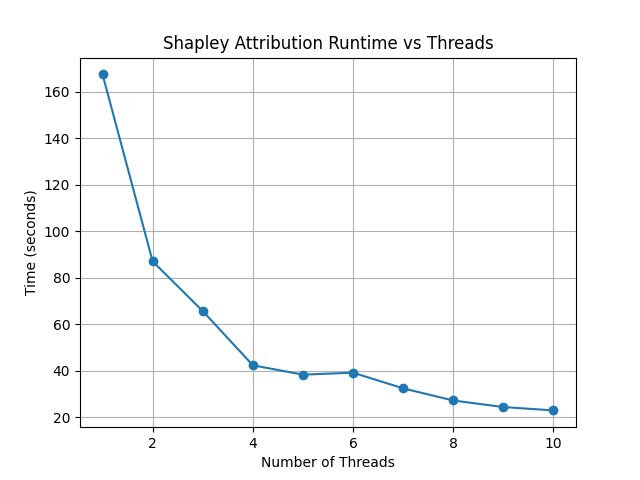
DataHandler#
A quick, practical guide to using llmSHAP.DataHandler for chunk-level attribution and perturbations.
Why it matters (chunk-level control)#
Unlike token-only approaches (e.g., word-level masking), DataHandler lets you choose your feature granularity:
words, sentences, paragraphs, or any fields you define. Pass a string for word-like tokens, or a mapping for sentence/section chunks.
This enables meaningful ablations (e.g., remove one sentence while keeping the rest).
1) Create a DataHandler from strings and dicts#
String input (auto-splits on spaces into tokens):
from llmSHAP import DataHandler

text = "The quick brown fox jumps over the lazy dog"
dh = DataHandler(text)  # keys become 0..N-1 (indexes of tokens)
Dict input (you control the chunks and their order):
from llmSHAP import DataHandler

data = {
   "s1": "Paris is the capital of France.",
   "s2": "The Eiffel Tower is in Paris.",
   "s3": "It was completed in 1889."
}
dh = DataHandler(data)
Tip
dict input is best when you want chunk-level attributions (sentences, paragraphs, fields). String input is fine for word/token-level.
2) Inspect features (indexes and keys)#
To retrieve the data, there are two main functions: get_data and get_keys.
from llmSHAP import DataHandler

data = {
   "s1": "Paris is the capital of France.",
   "s2": "The Eiffel Tower is in Paris.",
   "s3": "It was completed in 1889."
}

dh = DataHandler(data, permanent_keys={"s1"})

all_keys = dh.get_keys() # Returns the enumerated keys
print(all_keys) # Result: [0, 1, 2]

# Returns the non-permanent enumerated keys
non_perm_keys = dh.get_keys(exclude_permanent_keys=True)
print(non_perm_keys) # Result: [1, 2]

# Returns all the data
all_data = dh.get_data(dh.get_keys())
print(all_data)
# Result: {'s1': 'Paris is the capital of France.', 's2': 'The Eiffel Tower is in Paris.', 's3': 'It was completed in 1889.'}

# Returns the data at the specified indices
data = dh.get_data({1})
print(data)
# Result: {'s1': 'Paris is the capital of France.', 's2': 'The Eiffel Tower is in Paris.', 's3': ''}

# s1 is permanent and {1,2} are the indices of s2 and s3
data_no_mask = dh.get_data({1,2}, mask=False)
print(data_no_mask)
# Result: {'s1': 'Paris is the capital of France.', 's2': 'The Eiffel Tower is in Paris.', 's3': 'It was completed in 1889.'}

data_no_perm = dh.get_data({1}, mask=True, exclude_permanent_keys=True)
print(data_no_perm)
# Result: {'s1': '', 's2': 'The Eiffel Tower is in Paris.', 's3': ''}
Retrieve the index → key mapping using get_feature_enumeration.
index_feature_mapping = dh.get_feature_enumeration()
print(index_feature_mapping)
# Result: {0: 's1', 1: 's2', 2: 's3'}
3) Permanent keys (always-included context)#
Important
permanent_keys must match the actual keys in the internal mapping.
If you passed a dict, use the dict keys (e.g. “sentence_1”, “sentence_2”).
If you passed a string, keys are token indexes (0..N-1), so use integers (e.g. {0, 3}).
Dict input → use dict keys#
permanent_keys pins features that must always be present (e.g., instructions, the actual question).
They are auto-included unless you explicitly exclude them:
from llmSHAP import DataHandler

data = {
   "(0) instruction": "Answer briefly.",
   "(1) question": "In what city is the Eiffel Tower?",
   "(2) hint": "Think about landmarks in France.",
   "(3) distractor": "Cats are mammals."
}
dh = DataHandler(data, permanent_keys={"(0) instruction", "(1) question"})

# When requesting a subset, permanent ones stay:
print(dh.get_data(2, mask=False))
# Result: {'(0) instruction': 'Answer briefly.', '(1) question': 'In what city is the Eiffel Tower?', '(2) hint': 'Think about landmarks in France.'}

# Only the variable chunk (no pinned context):
print(dh.get_data(2, mask=False, exclude_permanent_keys=True))
# Result: {'(2) hint': 'Think about landmarks in France.'}
String input → use token indexes#
dh = DataHandler("The Eiffel Tower is in Paris", permanent_keys={0, 5})
print(dh.get_data(2, mask=False)) # includes tokens at indexes 0 and 5 automatically
When to use permanent keys:
Keep system/instruction text constant while perturbing evidence chunks.
Keep the question fixed while Shapley samples supporting sentences.
Ensure formatting/scaffolding remains valid across perturbations.
4) Perturb the data (mask vs remove) and build strings#
Select specific indexes (e.g., 1, 2, 3) and get a masked view (default mask_token is ""):
from llmSHAP import DataHandler

data = {
   "s1": "Paris is the capital of France.",
   "s2": "The Eiffel Tower is in Paris.",
   "s3": "It was completed in 1889."
}
dh = DataHandler(data)

view = dh.get_data({1, 2}, mask=True)
print(view)  # selected indexes show original text and others are mask_token
# Result: {'s1': '', 's2': 'The Eiffel Tower is in Paris.', 's3': 'It was completed in 1889.'}
Get only the selected features as a smaller dict (no masking):
subset = dh.get_data({1, 2}, mask=False)
print(subset)
# Result: {'s2': 'The Eiffel Tower is in Paris.', 's3': 'It was completed in 1889.'}
Turn a selection into a single prompt string:
prompt_str = dh.to_string({1,2}, mask=True)
print(prompt_str)
# Result: The Eiffel Tower is in Paris. It was completed in 1889.
Use a visible mask token if you prefer:
dh = DataHandler(data, mask_token="[MASK]")
print(dh.to_string({1, 2}, mask=True))
# Result: [MASK] The Eiffel Tower is in Paris. It was completed in 1889.
Non-destructive removal (returns a copy, original dh unchanged):
copy_removed = dh.remove({1}, mask=False)
Destructive removal (updates the handler and re-enumerates indexes):
dh.remove_hard({1})
5) Minimal end-to-end example#
Combine everything into a small workflow:
from llmSHAP import DataHandler

data = {
   "system": "Answer concisely.",
   "s1": "Paris is the capital of France.",
   "s2": "The Eiffel Tower is in Paris.",
   "s3": "It was completed in 1889."
}
dh = DataHandler(data, permanent_keys={"system"})

# Full prompt string (all chunks)
base_prompt = dh.to_string(dh.get_keys(), mask=True)

# Ablate s2 (keep s1 and s3). "system" is auto-included
keep_idxs = { dh.get_keys()[1], dh.get_keys()[3] } # Using get_keys as example instead of get_data
ablate_s2_prompt = dh.to_string(keep_idxs, mask=True)

# Variable-only dict (no permanent context)
exclude_permanent = dh.get_data({1, 3}, mask=False, exclude_permanent_keys=True)

print(f"Base: {base_prompt}")
print(f"Ablate s2 prompt: {ablate_s2_prompt}")
print(f"Exclude permanent: {exclude_permanent}")
# Result:
# Base: Answer concisely. Paris is the capital of France. The Eiffel Tower is in Paris. It was completed in 1889.
# Ablate s2 prompt: Answer concisely. Paris is the capital of France.  It was completed in 1889.
# Exclude permanent: {'s1': 'Paris is the capital of France.', 's3': 'It was completed in 1889.'}
DataHandler cheat sheet#
DataHandler(string)→ word/token featuresDataHandler(dict)→ chunk features you define (sentences/sections/fields)get_feature_enumeration()→ index→key mapget_keys(exclude_permanent_keys=...)→ iterable indexes for samplingget_data(indexes, mask=True/False, exclude_permanent_keys=...)→ dict viewto_string(indexes, mask=...)→ prompt-ready stringremove(indexes, mask=...)→ non-destructive copyremove_hard(indexes)→ destructive, re-enumeratespermanent_keys={...}→ always-include contextmask_token="[MASK]"→ visible masking in prompts